Apr 29, 2026
Construction Photo Documentation Software: How to Save Hours on Every Project
The first time it really registered for me was on a 3.2 million square foot distribution center build. Two years of work, multiple crews on site daily, and by the time we got to the punch list the project archive had something like ten thousand photos in it. Every time someone asked, "where was the rebar exposure on grid line G?", the only way to answer was to scroll, sort, and guess.
That's what this post is about. Not photo documentation in the abstract — the actual hours that go missing trying to find the right photo of the right thing on the right day.
I'm a civil engineer and land surveyor in Louisiana. Twelve years now, mostly commercial and industrial work, with a healthy share of ALTA surveys and wetlands permitting on the side. The photo problem looks the same on every one of those project types. Only the tooling around it has changed.
What "photo documentation software" usually is
If you've shopped for these tools, the offerings sort into three buckets:
- A photo gallery with metadata fields next to each image.
- A reporting app that drops photos into a template.
- A cloud bucket with sharing turned on.
They aren't bad. They just treat photos like a list. A list of two thousand photos isn't a list anymore — it's a haystack. Sorted by date, you can't tell inlet 4 from inlet 7, and labeling two thousand of anything is its own job.
What changes the math isn't a better gallery. It's putting photos on a map.
The workflow most teams actually run
For a long time my crews ran some version of this:
- Take photos on a phone, location on if we remembered.
- AirDrop or upload to a shared drive at the end of the day.
- Build the report a few days (or a few weeks) later, in Word or a deliverable template.
- Caption everything from memory.
It works on small jobs. I never thought twice about it on a half-acre commercial pad. It started to feel like a real cost on multi-phase work — distribution centers, LED Certified Sites due diligence, parks projects where the Corps was asking for site evidence on photos taken three months earlier.
Where it tends to go sideways:
- The phone records GPS in the EXIF, but unless the tool reads it, you're back to "near the southwest corner, I think."
- Captions written days late get generic. "Drainage inlet" instead of "Inlet 7, blockage at the outlet, photographed before clearing."
- Two field people on the same crew turn in two different report styles. Friday afternoons end up spent reformatting somebody else's work.
- Clients can't ask follow-up questions efficiently. They get a PDF and email back, "what's at this photo?" Another round trip, another day.
None of it is unmanageable when the volume is small. It compounds when it isn't.
What I look for in a tool
A few things, after enough iteration:
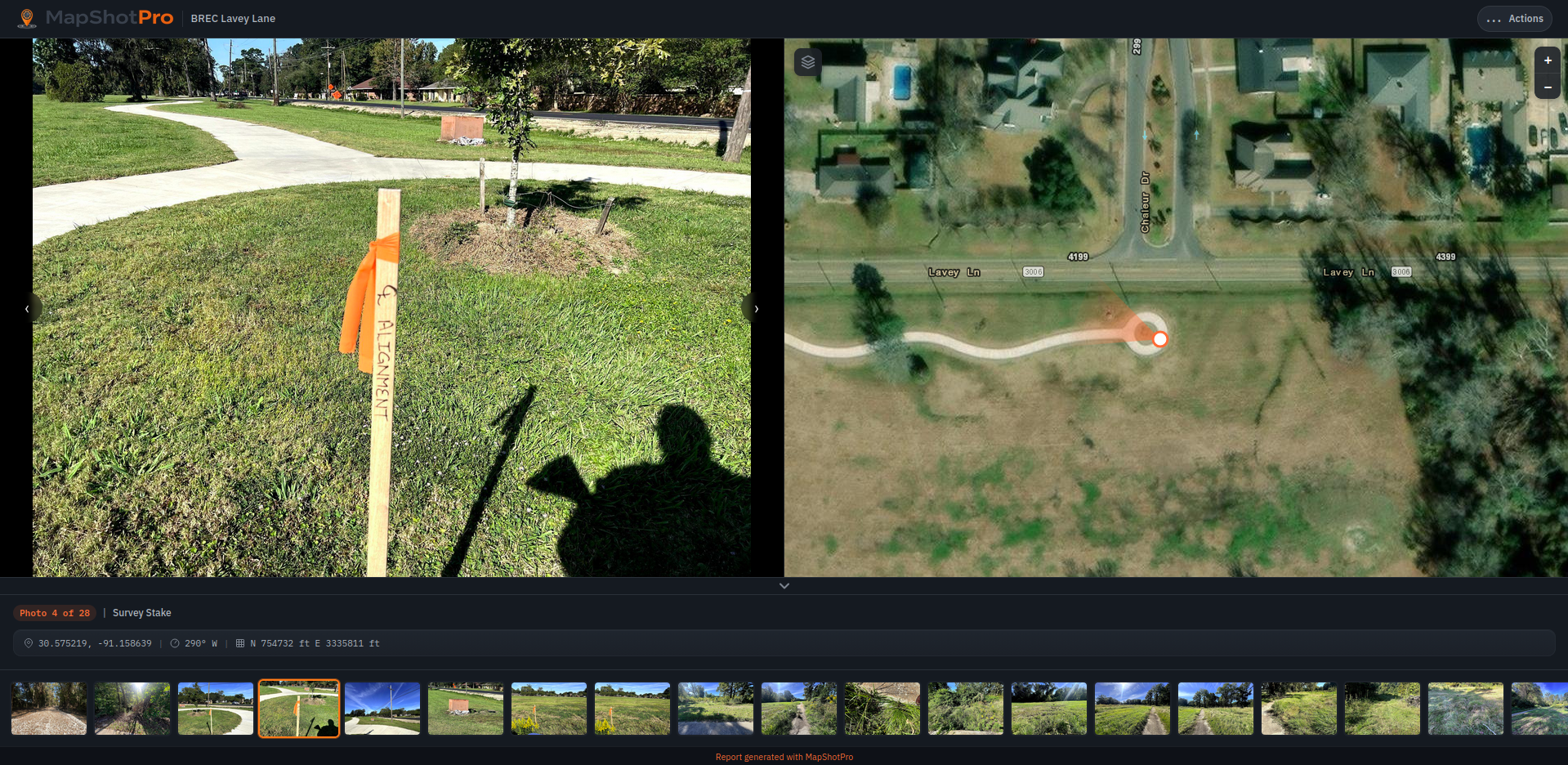
The photos land on a map automatically. You upload, the tool reads the GPS and bearing from the EXIF, the pins appear in the right place. If I'm dragging pins, I'm doing the same work in a different UI.
Bearing matters more than people give it credit for. On linear projects — drainage corridors, road work — knowing which direction the camera was pointing is the difference between "photo near the curb" and "photo of the curb." Same on ALTA work, where you're documenting monuments and adjoiner features and the orientation is half the evidence.
Captioning has to be one click. Click the photo, type a sentence, move to the next one. If there's a side panel and a save button and a re-find step, nobody captions anything. I've watched it happen on plenty of jobs.
The export should look professional without being styled. PDF, share link, headers, photo grid. If anybody is touching the file after export, the tool didn't finish.
Filtering, color-coded pins, fancy annotation — fine, but not what gives back the afternoon.
Why the map is the thing
Project teams navigate by space. Ask a PM where something happened and they'll point at a corner of a parking lot before they say a date. The phone's photo roll is sorted by time. The job is sorted by place. That mismatch is most of what eats the time.
When the photos land on a map automatically, a few things happen:
The location is most of the caption. "Inlet at the SE corner, post-clearing" is implied by the pin. You write less.
Coverage gaps become visible. If somebody walked the south half of the site and forgot the north, the map shows it. A list doesn't.
Clients open the report and immediately know what they're looking at. The follow-up emails drop off.
That's most of where the hours come back.
Where this matters most, in my experience
Some project types where the math swings hard:
Industrial site work. Months of grading and ground improvement, multiple crews on site, daily photo volume that nobody reviews until they have to.
Linear infrastructure. Roads, drainage corridors, utility runs. Long sites where date order is useless.
ALTA and boundary surveys. Monuments, encroachments, easement features — the location of the photo is the whole point.
Repeat inspections and multi-phase work. Same coordinates, different visits. Layered photos by location are how you actually see what changed.
Environmental and wetlands permitting. When the Corps asks for site evidence three months out, you need a specific photo at a specific spot, fast.
For a one-day visit to a small site, the folder-and-Word workflow is fine. Not every job needs the heavier tooling.
What I built
I built MapShotPro because I kept running into the same problem regardless of project type, and the existing tools either solved it with a heavier interface than I wanted or didn't really solve it at all. It runs in the browser, reads GPS and bearing, drops photos on aerial imagery, and exports PDFs and share links. No install, no account juggling.
I'm not pitching it as a category-killer. It's the version of this workflow I needed for the work I was doing. If you've spent Friday afternoons on the same problem, it might be the version you needed too.
Ready to try it?
Start your 7-day free trial of MapShotPro Pro. No credit card required.